What Is a Call Center? Types, Metrics and How They Work
Best Speech to Text APIs: 12 Leading Speech to Text APIs Compared
May 11, 2026

The speech-to-text API market hit $3.81 billion in 2024 and is on track for $8.57 billion by 2030 (Grand View Research). The field is now crowded with vendors that all claim to be the best. The best speech to text APIs pair low word error rates and sub-second latency with speaker diarization, wide language coverage and voice intelligence, not just a raw transcript. This guide compares 12 leading speech to text APIs, including Velma Transcribe by Modulate, Deepgram, Google, Assembly AI and Whisper, on real-time speed, accuracy, languages and analysis. Below you will find a side-by-side feature grid, an interactive vendor filter and head-to-head reviews of each API.
Speech-to-text APIs now process 500M+ hours of audio a month across enterprise apps, but a transcript alone isn't enough for fraud detection, healthcare scribing, or call-center QA. Here's how 12 leading APIs compare on real-time speed, diarization, languages, and voice intelligence.
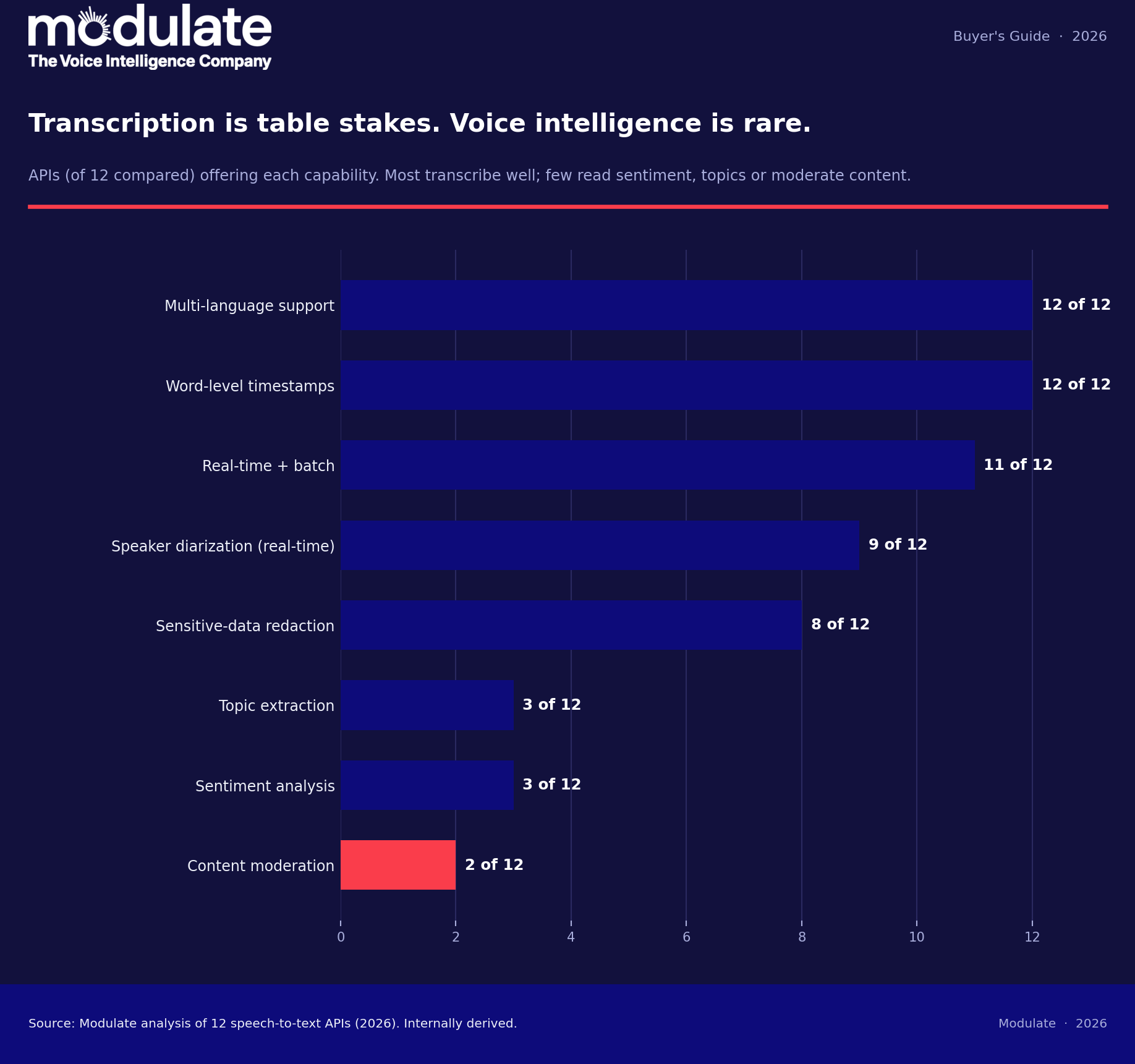
There are many speech to text APIs available, and they all have different capabilities for speech to text conversion. Only a few speech to text APIs can perform tone, intent, and behavioral analysis of the speech.
You can start with the custom tool we built to help you select the right Speech to Text API for your use case:
 ●MODULATE
Speech-to-Text API Selector
●MODULATE
Speech-to-Text API Selector
Which speech-to-text API fits your use case?
Answer 5 questions to see which category of speech-to-text API suits you, with example vendors. Runs entirely in your browser.
Recommended category
Guidance only, based on Modulate’s comparison of 12 speech-to-text APIs (2026). Verify current capabilities and pricing with each vendor. Your answers are not stored.
Below: a side-by-side feature grid, an interactive vendor filter, head-to-head reviews of each API, and answers to the most common buying questions.
In this article:
- Velma Transcribe by Modulate
- Deepgram Speech to Text API
- Google Cloud Speech to Text API
- Soniox
- OpenAI Whisper
- AssemblyAI
- Azure Speech
- Rev AI
- Speechmatics
- Amazon Transcribe
- IBM Watson Speech to Text
- Gladia
- Best Speech to Text APIs Comparison Chart
- What is a Speech to Text API?
- Transcription vs. Voice Intelligence
- Features to Look for in a Speech to Text API
- Frequently Asked Questions
Building the pipeline yourself? Our guide to speech to text Python tools walks through implementation or our explainer on transcription APIs covers how they work.
Velma Transcribe by Modulate

Overview
Velma Transcribe is Modulate’s speech to text API and one of the Dynamic Ensemble Blocks within Velma’s Ensemble Listening Model (ELM). Built specifically to understand conversational speech as it occurs naturally in real life, Velma hears speech the way it’s actually spoken: raw, messy, and rich with meaning beyond words. Velma Transcribe returns clean, complete transcripts that better match real-life conversations.
Send your audio file or audio stream to the Velma Transcribe endpoint. As part of Velma’s Ensemble Listening Model, Velma Transcribe orchestrates an ensemble of speech to text models to optimize accuracy and efficiency.
Traditional ASR extracts words from speech before sending them for NLP processing. Velma Transcribe delivers accurate results by combining large-scale real-world training data, deep experience running cost-efficient models, and a Dynamic Ensemble Block architecture that orchestrates multiple speech to text models. Instead of relying on a single model, it continuously selects the best approach for the audio, producing transcripts that better reflect how conversations actually happen.
Call the Velma Transcribe API with standard HTTP requests and JSON. Submit audio in widely used formats (WAV, MP3) with parameters unique to your workflow (enable speaker labels, set language). You’ll get JSON text ready to save, analyze, or send to another system.
Velma’s API keys work easily. Just put your key in the header. Use as much or as little of Velma as you need. Transcribe a 10-second clip or a full day’s recording with the same simple API calls.
Use Velma Transcribe with customer support software, call centers, QA workflows, or anywhere your app needs accurate text from speech. Because Velma’s API is fast, you can generate real-time transcribed dashboards, compliance records, or automatic minute-takers as soon as the audio is processed.
This is what we mean by voice-native transcription, which analyses the audio rather than only the transcript.
Key Features
Low Word Error Rate: Velma Transcribe provides industry-leading accuracy on real-world conversations. On the AMI Meeting Corpus, a benchmark with overlapping speakers and noisy, multi-party conversations, Velma avoids over 40% of the errors made by ElevenLabs and over 70% of the errors made by OpenAI GPT-40-transcribe. This means transcripts stay reliable even when speakers talk over each other or audio quality drops.
Batch & Streaming API: Whether you need to process audio files in batches or want to stream audio as it happens, Velma has you covered. Use batch for large pipelines and post-call processing. Use streaming for live captions, voice agents, and real-time systems. The API supports sub-second latency for live use cases.
Designed for Real-World Audio: Velma was built using more than 500 million hours of real-world voice recordings from customer platforms such as enterprise software companies and Fortune 500 companies in the delivery and logistics space. Velma’s AI handles cross-talk, multi-speaker conversations, filler words, diverse accents, typing noises, interruptions, and more. Velma is prepared for your audio to be messy and doesn’t lose accuracy when conversations don’t go as planned.
Structured, Production-Ready Output: Get segment-level timestamps, partial streaming transcripts, and clean formatting optimized for conversational speech. The API returns predictable JSON so you can plug transcripts directly into analytics, search, compliance, or LLM workflows.
Cost-Efficient at Scale: Velma Transcribe is designed for high-volume workloads. You pay usage-based pricing that supports large-scale deployment without inflating your infrastructure costs. This lets you transcribe more content across your product, not just a small sample.
Conversation First Foundation: Transcription is just the start. Velma Transcribe is built on a conversation-first foundation, with emotion signals already embedded in the transcription models today, though it’s not yet available as a standalone feature. This foundation sets the stage for future capabilities like synthetic voice detection and deeper conversation understanding.
Enterprise-Ready Security: Modulate applies ISO certified security processes across the entire organization. You can integrate Velma Transcribe into enterprise environments without changing your existing security posture.
Pros
- Extracts cleaner transcripts from real-life speech that include messy attributes like overlapping speakers and colloquial voice inflections
- Robust enough to transcribe recordings with background noise, interruptions, cross-talk, and more without requiring you to clean or preprocess your audio data
- 10x cost savings compared to other market leaders while delivering superior accuracy for real-world conversations
- Returns ready-to-use JSON that includes structure such as timestamps and speaker segments
- Easily connect transcripts to other systems for search, analytics, or feeding into ML models
- Accommodates growth so you won’t need to rebuild your infrastructure as your volume of transcribed audio increases
- Fits into existing security frameworks and compliance programs, so you can adopt it without weakening existing controls
Cons
- Velma’s ecosystem is newer compared to some long-standing speech to text providers, so you may find fewer community examples or SDKs initially
Get Started with Free Credits
Deepgram Speech to Text API

Overview
Use the Deepgram API for speech to text that you can use in any application that needs fast and accurate transcription. The API can be used with any kind of audio stream or recorded audio files. Choose from models that can be used for production environments.
Key Features
Transcribe Streaming Audio and Audio Files: The Deepgram API for speech to text allows users to transcribe both streaming audio and pre-recorded audio files. Deepgram claims sub-300ms latency in streaming use cases under optimal conditions; however, latency can vary based on configuration and load. Deepgram consistently ranks high for its batch processing speed (around 30 seconds per hour of audio processed in benchmark tests). This makes it well-suited for use cases like post-call analytics, transcription pipelines, and large-scale audio processing, while still being capable of live captions, voice-based virtual assistants, and speech analytics in some circumstances.
Choose Your Model: You can choose from a variety of models that can be used for speech to text. Additionally, they offer Flux, which detects when a speaker is done speaking using voice cadence instead of voice activity, which can be used for building a voice agent that can converse with users or for detecting turns in a conversation. Nova-3 can be used for any kind of speech to text task that needs accuracy. This model is useful for transcribing between languages as well as for noisy environments.
Speaker Diarization and Metadata Labeling: While Deepgram includes speaker diarization capabilities to identify and split up speakers within audio, what sets it apart is the ability to label speakers with metadata during batch processing. You can tag speaker segments with structured data to more easily organize, search, and analyze conversations at scale, which can be useful for use cases like call analytics and large transcription pipelines.
Smart Transcript Formatting: You don’t need to worry about formatting the transcript that you get from the API. This includes punctuation as well as capitalization. It also converts any number that appears in the text to a digit.
Custom Phrase Weighting: Improve transcription accuracy by specifying likely words or phrases that you want the model to prioritize. This allows you to direct the model toward domain-specific terminology, brand names, or frequently used phrases.
Language Support: Deepgram offers standard multilingual support across its models, though coverage varies by model. Nova-2 and Nova-3 support 35 and 48 languages, respectively, but Deepgram’s base models support just 21 languages. Deepgram’s industry-specific models, however, are English-only.
Sensitive Data Redaction: Automate PII redaction to ensure you are always compliant.
Pros
- Comprehend speech with high accuracy despite the presence of background noises, speech, and multiple accents being spoken simultaneously
- Flexibility to use different models according to your needs, with additional options to pay for custom model training
- Support for many languages to build multilingual applications without having to change services
- Fast batch processing speeds, making it suitable for post-call analytics, transcription pipelines, and large-scale audio processing
- Option for on-prem or self-hosted deployment, which can be important for teams with strict data control or compliance requirements
Cons
- Model differences can be confusing
- Third-party analytics, such as sentiment and behavior, may require a custom pipeline and/or require a third-party tool
- Complex pricing model for a pay-as-you-go model
Google Cloud Speech to Text API

Overview
The Google Cloud Speech to Text API converts audio to text by applying Google’s large trained speech recognition models to your audio data. Send a recorded audio file or a live audio stream to convert speech to text in real time. Use Google’s Speech to Text API to get a transcript of your audio in the language you need, so you can build voice-enabling features into your applications, audio captions, searchable audio, and more.
Key Features
Works with Live Streaming and Pre-Recorded Audio Files: If you want to use speech recognition for live streaming, you can do that as well as process all your audio files at once. This makes storing the output for parsing or indexing a breeze.
Multilingual Support: It supports over 125 languages and dialects, making it possible for you to expand the reach of your application.
Automatic Punctuation Option: Google Cloud Speech-to-Text API can automatically insert periods and question mark punctuations, format numerics, and capitalize the start of sentences.
Speaker Diarization: It‘s also able to recognize when the speaker changes, when there’s more than one speaker in the given audio file.
Custom Phrase Weighting: Improve transcription accuracy by specifying words or phrases that the model should prioritize. This allows you to bias recognition toward domain-specific terminology, product names, or common words and phrases used in your application.
Confidence Scores and Word-Level Timestamps: In addition to the timestamp for the transcription start time, word-level timestamps are also provided, making it possible for you to use the confidence scores.
Pros
- Scalable for high-volume workloads, with support for integrating with other cloud-based services
- Multilingual support, including many dialects
- Basic automatic formatting, making the transcript easier to read without the need for manual formatting
- Integrates easily with the Google Cloud ecosystem
Cons
- Pricing may become costly, particularly in the processing of high-volume workloads of audio files
- May not offer the same level of low latency as other providers, depending on the implementation, network, and model used
- May have too many options, particularly for users who have basic transcription needs
Soniox

Soniox offers a single speech to text API for developers and companies to leverage. It converts speech audio to text in real time, allowing for various use cases such as real-time transcription, voice agents, and multilingual support.
Key Features
Real-time, Low-Latency Streaming or Asynchronous Transcription: Developers can choose to stream audio to Soniox and receive text in real-time, word by word, as the speaker speaks, for real-time transcription and voice agents, or they can send recorded audio to be transcribed asynchronously for batch transcription scenarios.
Supports Many Languages without Switching Models: Soniox supports transcription of speech in over 60 languages and dialects. Developers don’t need to worry about choosing the language model they wish to use, and the model will automatically support mixed language speech should the speaker change languages mid-sentence.
Speaker Diarization: The Soniox API can automatically detect and separate speakers in real-time when there are more than two speakers in the audio being transcribed. This can be used to clean the text and even to determine who spoke when in a meeting or conference call scenario.
Integrated Translation Support: Translate speech in real-time rather than after the fact. The Soniox API supports many language pairs for translation, so this can be done in real-time for scenarios across the globe.
Custom Phrase Weighting: Improve your transcription accuracy for specific terms and company-specific language and terminology without having to retrain your speech models. Provide hints and context to the Soniox API to better understand and transcribe technical and medical terms.
Pros
- Easy to integrate with your application via SDKs, with minimal technical learning curve required
- One model supports over 60 languages, including multiple dialects and mixed language speech, without the need to switch between models
- Operates in multiple regions, ensuring your audio, transcripts, and logs stay in the region, meeting privacy requirements
Cons
- Token-based pricing model may make it hard to estimate costs, depending on the transcript length variations
- Smaller ecosystem and fewer integrations compared to larger cloud providers
OpenAI Whisper

Overview
Convert audio files into text using the OpenAI Whisper speech-to-text API. Whisper-1 is the speech recognition model used in the OpenAI Whisper API, which is trained on hundreds of thousands of hours of multilingual speech data, making it a general-purpose speech recognition model. Simply send the audio file or audio stream to the API, and you’ll get the transcript in an easily readable format, which you can use for captions, transcribing meetings, voice-enabled apps, content search, and much more.
Key Features
Transcribe Dozens of Languages: Whisper is trained on hundreds of thousands of hours of audio in many languages. It supports audio in many languages, so you don’t have to use separate models for each language.
Translate Speech to English: Whisper supports translation of speech in audio files you send to the API. So, if you have audio files in languages other than English, you don’t have to take an extra step to translate the speech in the files.
Easy API Integration: Upload an audio file or send an audio stream, and you get a transcript. You can use Python, JavaScript, and many more programming languages to stream the audio and get the transcript results in your application.
Supports Common Audio Formats: Whisper API can accept a variety of audio inputs, including WAV, MP3, M4A, and many more.
Pros
- Transcribes many languages with a single model, reducing the need to use separate models for different languages
- Recognizes accents, speech at varying speeds, and speech with background noise better compared to other models
- Includes timestamps at segment and word levels to align the text with the audio for better captions and search functionality
- Open-source model gives users full control over deployment, customization, and data handling
Cons
- File size limit of 25 MB, which can be a drawback for long recordings or large files that need to be transcribed
- Longer end-to-end processing time for the whole recording compared to other APIs that can stream the audio
- Doesn’t include speaker diarization, so you would need another service for that as well
AssemblyAI
Overview
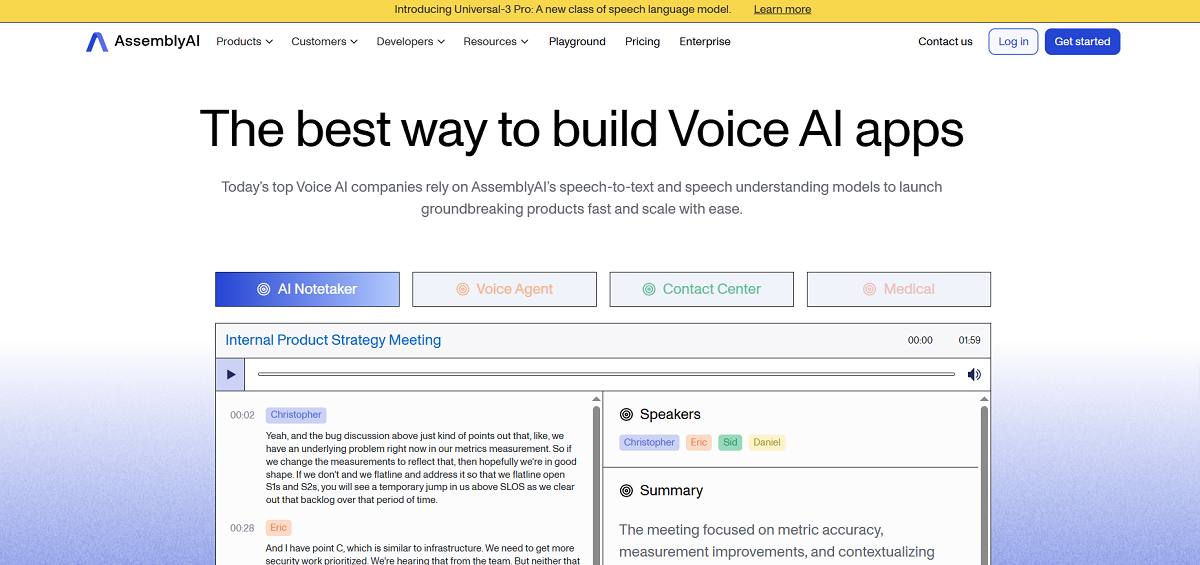
Assembly AI transcribes your audio into text using powerful AI models built specifically for production. You can upload your pre-recorded audio files or stream your audio directly from your application to the API. Get accurate transcriptions with features that help you better understand your voice data. It’s useful for anything from generating captions, meeting notes, or building conversational analytics, to building voice agents.
Key Features
Accurate Transcription: The universal models of AssemblyAI are very accurate, even for low-quality audio containing background noises.
Streaming and Batch Processing: With AssemblyAI, you can stream your audio for real-time transcription, as well as upload a prerecorded audio file for batch processing. This is helpful for creating applications that need a real-time response, as well as those that need offline functionality.
Speech Tagging and Understanding: AssemlyAI offers speech understanding features such as speaker labels/roles, text sentiment, topics, and summarization. This requires providing a list of topics and descriptions, as well as labels or roles and contextualizing prompts to identify. This is an add-on feature that costs extra, but it allows you to further customize your call analytics/business intelligence solution.
Multi-Language Support: The models are trained on a variety of data, including data from multiple languages. This is helpful for applications that need to handle more than one language, as AssemblyAI is able to automatically detect the language being spoken and accurately transcribe it.
Custom Phrase Weighting: Improve transcription accuracy by specifying words or phrases that you want the model to prioritize. This allows you to create a bias for recognizing slang, industry jargon, brand names, or other domain-specific terms without retraining the model.
Automatic Formatting: The transcripts are automatically formatted, including punctuation and capitalization. This also includes lists and numbers.
Build Flexible Integrations: With SDKs and extensive documentation, integrating the REST and WebSocket endpoints is easy.
Flexible Pricing: AssemblyAI offers a pay-as-you-go pricing model. There are different models to choose from, as well as speech understanding add-ons to suit your needs.
Pros
- Highly accurate transcriptions with additional contextualization features enabled
- Strong developer experience with clear documentation, SDKs, and easy integration workflows
- Flexible API design supports real-time and batch use cases
Cons
- Speech understanding add-ons like summarization or topic detection are in more expensive tiers and require per-transcript metadata configuration, which can become costly if your use case requires multiple features
- If your use case doesn’t require features like sentiment analysis, fact checking, or custom words, deciding which plan and model to use can become confusing
- Latency will depend on internet speeds as well as which model is being used
Azure Speech

Overview
The Azure Speech to Text API (by Microsoft Foundry) is a speech recognition service for audio. It allows users to integrate other Azure services to build speech and language solutions. The user can input recorded audio or audio from a live conversation to obtain detailed transcripts. The user can then use these in captions, call analytics, voice commands, and accessibility integrations. The entire platform is hosted in Microsoft’s cloud infrastructure and can scale from small apps to large enterprise solutions.
Key Features
Streaming & Offline Transcription: Azure allows you to stream audio directly for real-time transcriptions or upload pre-recorded files. Azure claims that it can provide near-real-time streaming transcription, but depending on your configuration, networking, and selected model, your actual latency may far exceed the optimized benchmark of 250 ms for fast transcription service. Batch processing can be used to process large numbers of audio files.
Broad Language Support: It supports many languages in speech-to-text transcription. Thus, users can create apps for global consumers without changing anything.
Formatting & Speaker Diarization: By default, the Azure Speech to Text API includes punctuation and capitalization in transcripts. Azure can perform speaker diarization to automatically identify and tag speakers in audio with more than one speaker.
Speaker Recognition (Voice Profiles): Azure also offers speaker recognition that lets you identify a specific person in audio; however, voice profiles (voice ID prints) must be stored prior to identification. The setup process can be complex, and performance is typically more reliable in controlled audio conditions than in noisy, real-world environments.
Custom Phrase Weighting and Custom Model Training: You can increase transcription accuracy by providing words/phrases that you want the model to favor (custom phrase weighting). Azure also offers even more control with custom model training for advanced scenarios. With custom model training, you have the option to provide your own audio and transcripts.
Timestamps and Word Confidence: Timestamps are provided at each word so users can match their transcriptions to audio. Confidence scores are also provided so users can identify which words in a transcription may need to be reviewed.
Secure and Scalable: Azure has a good security record. The speech to text service is hosted in their cloud environment. The service also allows users to deploy to multiple regions and offers compliance to most privacy standards and regulations.
Pros
- Word timestamps and confidence values are provided to match transcriptions to audio or to identify quality
- Integrated into Microsoft’s cloud-based infrastructure to offer security and compliance to most enterprise standards (requires use of Azure services)
- Integrates directly with other Azure products like Blob Storage, Cognitive Search, Logic Apps, etc. so users don’t need to leave Azure to build integrations
Cons
- The pricing structure can be complex depending on the options chosen (CSV, Translation, Speaker Identification) as well as the volume of audio being processed
- Latency on live streams can also fluctuate depending on network speeds as well as the chosen configuration
- Additional features such as scaling, storage, and analytics would require additional features from other Azure products that may not work with the chosen tech stack or budget
Rev AI

Overview
Rev AI is a speech to text API that can transcribe recorded audio as well as live audio streams. The Rev AI speech to text API is best used by developers who need high-quality speech recognition for integration with applications. The Rev AI speech recognition models are trained on millions of hours of data and have a low word error rate (WER) on a wide variety of real-world audio.
Key Features
Accurate Transcription: Rev AI’s speech recognition models are trained on a mix of real-world audio sources, such as earnings calls, podcasts, and legal depositions. These tend to be structured recordings with clear speaker roles and high-quality audio. Some training data may include more challenging audio (“dirty audio”), such as bodycam recordings, but it’s unclear how much dirty audio was used in model training.
Batch and Streaming APIs: Upload an audio file to Rev AI to get an asynchronous transcription result or transmit an audio stream directly to Rev AI to get a transcription result in real-time or look back in history.
Custom Phrase Weighting: Customize Rev AI's speech recognition models to best suit your needs by training them to prioritize industry-specific words, jargon, or brand names.
Speaker Diarization and Timestamps: Add speaker labels to your transcript to differentiate between speakers for batch transcription. Word-level timestamps can be used to sync the text to the audio (for captions or further analysis). These features are primarily available through Rev AI’s asynchronous (batch) transcription service.
Wide Language Support: Speech recognition is available in more than 50 languages asynchronously. You can also stream audio in multiple languages at once. Create speech experiences that support multiple languages for your users.
Post-Transcription Insights: Extract intelligent insights from speech transcripts. Get more insights from your speech transcripts with translation, text sentiment analysis, language identification, and topic extraction for batch transcription. These features are applied after transcription (typically in batch workflows) and return structured outputs based on the text rather than analyzing the audio directly.
Pros
- Speech recognition comes back punctuated, capitalized, and normalized to reduce post-processing needs
- Offers asynchronous topic extraction for batch transcription, including both unstructured topic discovery and prompted keyword-based analysis for post-transcription insights
- The REST API is very simple to use, and the documentation is complete and available online without needing to sign up for an account
Cons
- Some additional features are paid options, which can become expensive compared to some of the other options
- Most additional features are only available for batch transcription
- Requires an internet connection and doesn’t support local/embedded deployment
- If you’re looking to do ultra-low latency (less than 100ms) speech to text for live customer agents, then you’re better off with a specialized speech to text engine
- You’ll also need to develop an external pipeline or integrate with analytics tools of choice
Speechmatics

Overview
Speechmatics provides audio to text transcription in dozens of languages and accents with its speech recognition API. Send in prerecorded audio files or audio streams to extract clean text from virtually any audio source with features such as custom vocabulary support and speaker diarization.
Key Features
Works with Dozens of Languages: Supports more than 55 language and dialect combinations. So, if your application requires support for multiple languages, you won’t need to integrate multiple speech to text engines.
Streaming and Batch Processing: Speechmatics does offer streaming functionality; however, latency is usually higher than specialized ultra-low-latency systems (microseconds). Latency performance is usually sub-second, but real-world results vary depending on your configuration. Because of this, Speechmatics is better used for batch processing or non-real-time response scenarios.
Handles Noisy Audio: Performs well on phone calls, interviews, meetings, field recordings, etc., because Speechmatics is trained on real-world audio from the get-go.
Custom Phrase Weighting: Improve transcription accuracy by specifying words or phrases that you want the model to prioritize. This allows you to create a recognition bias toward domain-specific terminology, like legal, medical, technical, or financial language, without retraining the model.
Speaker Diarization and Channel-Based Speaker Labels: Speechmatics supports standard speaker diarization to separate speakers in multi-speaker audio. It also offers per-channel metadata speaker labeling, which is useful when you have one speaker per audio channel. Voice identification is also available using known speaker voice prints.
Flexible Output: Speechmatics provides word level timestamps and confidence scores for each word in its transcripts by default. This should allow you to line your transcripts up with the audio your application processed and determine how you'd like to handle words that are below a certain confidence level.
Pros
- Output includes word level timestamps and confidence scores to line up your transcripts with the audio and decide how to handle words that are below a certain confidence level
- Deploy the API on the cloud infrastructure, on-device, or on your own hardware/virtual private server to satisfy compliance requirements
- Flexible speaker handling options, including standard diarization, per-channel metadata speaker labeling, and voice ID using known voice prints
Cons
- Doesn’t natively integrate with any of the major cloud service platforms (AWS, Azure, Google Cloud), so if you want services like that, you’ll have to do a little bit of work to integrate that into your application
- Lacks high-level insights (sentiment, topics, summarization) that other APIs on this list offer
- Not necessarily the best API to use when you need ultra-low latency responses (live voice assistants that need to respond in <100ms, etc.)
- Requires work to create custom vocabularies that will be best suited to your application
Amazon Transcribe

Overview
Amazon Transcribe is Amazon’s ASR API that converts spoken audio information into machine-readable text. Transcribe is a speech-to-text API that allows users to add speech-to-text capabilities to their applications, streamline workflow, and leverage speech as part of analytics. Amazon Transcribe uses artificial intelligence to learn from real-world audio to create accurate transcriptions, including punctuation and capitalization. It can also recognize different accents and background noise.
Key Features
Real-Time and Batch Transcription: Transcribe accepts real-time audio input from your application to provide near-real-time captions. It also accepts batch audio files (.mp3, .mp4, .wav). (You can also have your audio files sent to Amazon Transcribe by having them save to S3 and triggering a job with Amazon S3 Events.)
Multi-Language Support: Transcribe supports over 100 languages, so you can create multilingual applications without using many services.
Automatic Formatting: This can save you some steps if you need transcripts and are planning to use them as-is for another process.
Speaker Diarization and Channel Identification: Identify speakers who are involved in a conversation contained in a single file. Channel identification enables you to identify which channel a speaker was on if there are multiple channels in a recording.
Custom Vocabulary and Language Models: You can improve recognition for domain-specific terms, acronyms, and uncommon phrases by adding custom vocabularies or training custom models.
Content Moderation and Redaction: Does your speech contain words or information that you want to exclude from your transcript? With Amazon Transcribe, you can easily configure to redact these words. It can also automatically detect PII.
Timestamps and Confidence Scores for Words: Need to keep your text in sync with the audio or want to know how well it did on a given transcript? Amazon Transcribe provides word level timestamps as well as word confidence scores.
Domain-Specific Variants: If you’re looking to extract information from doctor-patient interactions, try Amazon Transcribe Medical. If you want to gain customer insights from call centers, there’s Amazon Transcribe Call Analytics.
Pros
- Can provide custom vocabulary and build your own language models
- Has content moderation tools to filter out unwanted words to ensure compliance
- Provides word-level timestamps along with confidence scores to evaluate the quality of your transcript
- Can easily integrate with other AWS products
- Specialized modules designed for the healthcare and contact center verticals
Cons
- Using special features on multiple domains can be costly
- Using Amazon Transcribe to its full potential can also require additional AWS products such as storage, compute power, and other data analytics tools
- May take work to integrate with your current infrastructure if you’re not using AWS products
- Ultra-low latency use cases might require other architectures or tuning
- Heavily accented speech or less common languages and noisy audio might not transcribe well
IBM Watson Speech to Text

Overview
IBM Watson Speech to Text API provides automatic speech recognition and transcribes audio into text. You can send audio streams or files with audio already recorded. Watson Speech to Text API is a part of IBM Cloud and is highly scalable from prototypes to production environments.
Key Features
Transcribe Live or Pre-recorded Audio Streams: You can use the Watson Speech to Text API with audio streams from live conversations (<1 s latency) or audio files from pre-recorded conversations. A lower-latency option is available, but reducing latency significantly increases the word error rate. You can also get transcriptions as text-streams of what’s being said while people are still speaking.
Wide Variety of Supported Languages: You can select your target language for the speech to text API. You also get support for certain accents or dialects for your languages.
Capable of Formatting Your Transcript Automatically: The speech to text API is capable of automatically formatting your transcript with punctuation and capitalization. So, you don’t have to perform any additional operations to get a readable transcript.
Customizable Language and Acoustic Models: The speech to text API is also capable of customization using your audio to further tune the language model for your specific use case.
Speaker Diarization: The speech to text API is capable of labeling up to 6 different speakers within a conversation. One-speaker-per-channel labels are also supported.
Word-Level Timestamps and Word Confidence Scores: Outputs include word-level timestamps, which will allow you to align the transcript with the corresponding time in the audio file. Optionally, word confidence scores can provide you with information about the word that the speech recognition service predicts.
Transcribe Audio with Background Noise: Your application should handle dialogues, songs, or any other sounds that may have happened in the background while the audio was being recorded in real life. It should minimize the chances of incorrect word recognition due to background noises.
Pros
- Doesn’t require cleaning the transcript before you can use the results in an application
- Customizable with your own data and vocabulary for better recognition
- Improves over time, recognizing industry-specific terms and jargon
- Provides word-level timestamps, word confidence scores, and support for real-world noisy audio
- Supports on-premises and private cloud deployment via IBM Cloud Park for Data, providing full control over data residency, compliance, and air-gapped environments
Cons
- Its pricing model is complicated, depending on the scale of the application and the usage patterns
- For maximum benefit, security, data analytics, and the like, you would likely have to use other IBM Cloud tools, which might not integrate well with non-IBM infrastructures
- Customization may take time, depending on whether you want custom vocabulary support or acoustic models
- Lacks the bells and whistles of topic detection, summarization, or sentiment analysis, unlike some of its peers
- May have varying latency depending on the network, making it less than optimal in such cases
Gladia
Overview
The Gladia Speech to Text API allows developers to get fast and accurate transcriptions for live as well as recorded audio streams. The speech recognition system recognizes more than one hundred languages while at the same time allowing developers to get additional text data and insights that can be integrated with a variety of applications, including meetings, call analytics, voice assistants, video ingestion, among many more. The automatic speech recognition system comes with a variety of intelligent options that can be used to generate machine-readable transcripts as well as metadata.
Key Features
Real-Time/Asynchronous Transcription: Gladia can transcribe live as well as recorded audio streams in real time with minimal lag, or you can choose to transcribe the recorded audio after the full recording has ended. This flexibility allows you to use Gladia for a variety of use cases, including live transcriptions for live captions, live speech assistants, as well as recorded speech for file-based speech recognition.
Multilingual Support for Over 100 Languages: Gladia can support more than one hundred languages, including major languages as well as their respective dialects. It can also support changes in languages in the middle of a conversation.
Speaker Diarization with Word-Level Timestamps: Gladia supports speaker diarization for batch transcription to separate speakers in audio that includes multiple speakers. Word-level timestamps help you include time references next to your transcribed text at a high degree of accuracy.
Custom Vocabulary and Custom Spellings: Gladia offers advanced customization beyond standard phrase weighting, allowing you to define phonetic pronunciation, specific language, and phonic intensity. However, this requires more detailed metadata and more complex setup compared to simpler keyword weighting approaches.
Audio Intelligence Add-Ons: The API not only provides basic text output but also offers add-ons such as entity recognition, translation, and text sentiment analysis. This allows you to make the most of the API for batch transcription.
Simple Developer Integration: It’s easy to integrate the API with the HTTP API and WebSocket. It supports programming frameworks like Python, JavaScript, etc.
Pros
- You can also add your own vocabulary, so it can better understand industry-specific terms that have different spellings with a high level of fine-tuning at the phonetical level
- Strong multilingual support, often cited by customers building applications for global or multilingual user bases
Cons
- Lag times will vary depending upon your API integration
- Additional information will cost you more and add complexity to your application
Best Speech to Text APIs Comparison Chart
●MODULATE
Speech to Text API Comparison
How 12 speech to text APIs compare
Velma Transcribe by Modulate alongside Deepgram, Google Cloud, Soniox, OpenAI Whisper, AssemblyAI, Azure Speech, Rev AI, Speechmatics, Amazon Transcribe, IBM Watson and Gladia across 20 capabilities. Scroll sideways to see every platform. The feature column stays in place.
| Feature | Velma Transcribe by Modulate | Deepgram Speech to Text API | Google Cloud Speech to Text API | Soniox | OpenAI Whisper | AssemblyAI | Azure Speech | Rev AI | Speechmatics | Amazon Transcribe | IBM Watson Speech to Text | Gladia |
|---|---|---|---|---|---|---|---|---|---|---|---|---|
| Real-Time and Batch Transcription | Yes | Yes | Yes | Yes | Batch (Real-time via wrapper) | Yes | Yes | Yes | Yes | Yes | Yes | Yes |
| Asynchronous Transcription | Yes | Yes | Yes | Yes | Yes | Yes | Yes | Yes | Yes | Yes | Yes | Yes |
| Multiple Language Support | Yes | Yes | Yes | Yes | Yes | Yes | Yes | Yes | Yes | Yes | Yes | Yes |
| Language Translation | No | No | Yes | No | Yes | Partial | Yes | No | Yes | Yes | Yes | Yes |
| Language Identification | Yes | Yes | Yes | Yes | Yes | Yes | Yes | Yes | Yes | Yes | Yes | Yes |
| Voice ID Print Technology | No | No | No | Yes | No | Yes? | Yes | No | Yes | No | No | No |
| Real-Time Speaker Diarization | Yes | Yes | Yes | Yes | No | Yes | Yes | No | Yes | Yes | Yes | No |
| Batch Speaker Diarization | Yes | Yes | Yes | Yes | No | Yes | Yes | Yes | Yes | Yes | Yes | Yes |
| Content Moderation | Yes | No | No | No | No | Yes | No | No | No | No | No | No |
| Sensitive Data Redaction | Yes | Yes | Yes | No | No | Yes | Yes | No | Yes | Yes | Yes | No |
| Word or Segment Level Timestamps | Yes | Yes | Yes | Yes | Yes | Yes | Yes | Yes | Yes | Yes | Yes | Yes |
| Confidence Scores | Yes | Yes | Yes | Yes | No (not native) | Yes | Yes | Yes | Yes | Yes | Yes | Yes |
| Automatic Punctuation and Formatting | Full formatting of text and phrases | Full formatting of text and phrases | Limited punctuation, not included by default but can be enabled by the user | Full formatting of text and phrases | Limited punctuation | Full formatting of text and phrases | Full formatting of text and phrases | Limited punctuation | Full formatting of text and phrases | Full formatting of text and phrases | Limited punctuation | Full formatting of text and phrases |
| Keyword Weighting | Advanced | Advanced | Advanced | Advanced | Basic | Advanced | Advanced | Moderate | Advanced | Moderate | Moderate | Advanced |
| Custom Vocabulary and Language Controls (Advanced Metadata Specification) | Advanced | Advanced | Advanced | Advanced | Basic | Advanced | Advanced | Moderate | Advanced | Moderate | Moderate | Advanced |
| Text Normalization | Yes | Yes | Yes | Yes | Limited | Yes | Yes | Yes | Yes | Yes | Yes | Yes |
| Topic Extraction | Yes | No | No | No | No | Yes | No | No | No | No | No | Yes |
| Sentiment Analysis | Yes | No | No | No | No | Yes | Yes (via Text Analytics) | No | No | No | Yes (NLU) | Yes |
| Multiple Models | Yes (ELM, but not something the user can select) | Yes | Yes | No | No | Yes | Yes | Yes | Yes | Yes | Yes | Yes |
| Custom Models | No | Yes | Yes | No | No | Yes | Yes | Yes | Yes | Yes | Yes | Limited |
Compiled by Modulate from public product information, 2026. Yes = full capability, Limited or Partial = partial, No = not offered. Verify current capabilities with each vendor.
What is a Speech to Text API?
A speech-to-text API is a cloud service that converts spoken audio into machine-readable text by running it through an automatic speech recognition (ASR) model.
You can input either the audio file or the audio stream, and the API will provide the output as text.
At its most basic level, speech to text technology works in conjunction with a function called automatic speech recognition, or ASR. The program listens to the audio and translates it into words. The more advanced ASR programs use what’s called a deep neural network, which is essentially a program that’s been fed tons of real-world audio. This is why they’re so much better at recognizing different accents, background noise, and speaking styles.
Most speech to text APIs offer two options:
- Real-time streaming transcription for live audio sources
- Batch transcription for audio files
The better speech to text APIs offer additional value-added services including:
- Speaker Diarization to determine who’s talking when
- Word-level timestamps to sync text with audio
- Vocabularies to tailor to specific industries
- Word confidence levels to flag words for further review
The thing is, though, speech to text is only useful for determining what was said. It doesn't determine how it was said, emotions behind it, whether someone was deceptive with their speech, etc. Unless you specifically use analytics tools with your speech to text API, it’s not capable of determining meaning or intent behind speech.
It’s great for readable text transcriptions. It’s not so great for determining intent behind speech.
Transcription vs. Voice Intelligence
Most speech to text APIs offer transcription services for audio files to text. These platforms are primarily concerned with determining what was said. You’ll end up with a transcript to analyze later using text analytics tools.
Transcription is a process where audio is converted to text but loses all audio signals.
Text Analytics
Text analytics is a process where words are already transcribed and analyzed for meaning. This is a process where text sentiment analysis is conducted, keywords are searched for, entities are searched for, etc. For example, when a person says, “I’m fine,” the text analytics system is only able to read the words “I” and “fine.” It has no way of knowing that the person was being sarcastic, nervous, afraid, or using manipulation techniques to get a certain response from another person.
Text analytics works perfectly well if what you want to do is:
- Have a searchable transcript
- Conduct compliance scanning for certain keywords
- Take meeting notes
- Conduct basic analytics on a call
It cares about the content of what’s being said. The linguistic tone can be inferred by looking at what’s on the page. If the words being said are neutral, then it’s a neutral conversation.
Voice Intelligence (Audio Native)
Audio native platforms are those that analyze the sound wave. They don’t transcribe; they look at tone, prosody, pitch, changes in pitch, speaking rates, pauses, and stress. Voice Intelligence is a class of tools that try to understand how something was said.
This is important if what you care about is:
- Fraudulent or deceptive conversations
- Social engineering attacks
- Emotional pitch in support conversations
- Rage quitting in voice-based live chat rooms
People can say whatever they want to say, and it can come off as non-threatening. However, if you listen to how they say it, there’s stress in their voice. You can’t catch that from a transcription. These audio native programs can catch those types of vocal red flags in real time.
Transcription is great if all you need to know is that there’s a clean transcript. Voice Intelligence is important if you care about the behavior aspect of conversations. If you care about whether or not something bad or interesting is going on, then Voice Intelligence is important. If all you care about is the documented written words, then transcription is sufficient.
Features to Look for in a Speech to Text API
Not all speech to text tools are made equal. Make sure that the tool you choose to use can handle your intended use case.
Don’t use a service that is great for demos but not for your real audio needs. These are things to consider when comparing speech to text services.
Accuracy on Real-World Audio
Studio-quality audio is not your problem. Real audio has noise, cross-talk, accents, mispronunciations, varying speech rates, etc.
How do these services perform on real audio? Do they publish Word Error Rate (WER) benchmark numbers? Were these words carefully selected from actual audio samples?
If you’re evaluating a speech to text API for healthcare, finance, gaming, customer support transcripts, etc., you want to verify these numbers using your actual audio samples because that’s what you’ll be using.
Streaming vs. Batch Processing
How you use a speech to text API will determine how you use it. Do you need real-time speech to text for voice bots? Do you need to transcribe audio files?
Streaming APIs give you real-time speech to text to help you build voice bots.
If you’re building a voice bot or a real-time chatbot, a streaming API might be useful to you. Also, verify latency to ensure it will work for real-time use.
Speaker Diarization
Is there more than one person talking? Speech to text services offer speaker diarization to identify speakers based on audio characteristics.
Without speaker diarization, speech to text is basically useless for call analytics. Some services also offer speaker label attribution for well-known speaker labels.
Confidence scores also show how confident the API was when making a word selection.
Businesses operating in heavily regulated industries require confidence scores to determine when to review a portion of a transcript.
Word-Level Timestamps and Confidence Levels
Timestamps allow you to sync audio and text. You’ll want this for captions, searchability, compliance auditing, and collaborative audio editing. Timestamps should be provided at the word or phrase level.
Confidence scores also show how confident the API was when making a word selection.
Businesses operating in heavily regulated industries require confidence scores to determine when to review a portion of a transcript.
Custom Vocabulary
Don’t assume that industry-specific terminology is known to the API. Make sure that the API supports custom words. This could be individual words, phrases, words, and common misspellings. Brand words are also often supported.
For niche industries, you may want to consider speech-to-text APIs that offer domain-specific models trained on medical, legal, and financial speech.
Multi-Language Support
Do your users speak more than one language? Not all speech to text APIs auto-detect languages out of the box. Be prepared to change language models when needed.
Automatic Formatting
Having clean transcripts is a time-saver. Take advantage of features that offer auto-formatting of punctuation, numbers, and dates. Automatic transcription cleanup is a significant time-saver for you.
Encryption and Compliance Standards
You are uploading your voice recordings to a third-party platform or giving a third party access to live conversations through your application or service. Make sure that they support encryption for data transmitted and data at rest.
Also, ask about their compliance standards and certifications.
Transparent Pricing
Speech-to-text APIs are often charged by minute, second, or token. Understand how streaming vs. batched audio impacts pricing.
Diarization, custom models, and add-on features, such as sentiment analysis, also increase costs. Before committing to a production-ready API, calculate a proof of concept estimate using real speech data.
A Better Metric Than Transcription Accuracy
Do you actually need speech to text? Language modeling tools are fantastic at converting speech audio into text. Think about all the scenarios where speech to text is not enough. Behavioral monitoring, fraud detection, toxicity detection, sentiment analysis – these require more context than speech to text can offer.
These applications require analysis of tone, intent, and audio signals directly from sound waves. Pick a tool that can give you the result you desire. Not just a pretty feature set.
Frequently Asked Questions
What is the difference between speech recognition and speech to text?
Both speech recognition and speech to text are commonly used interchangeably. When put into use, both essentially use Automatic Speech Recognition (ASR) technology to transcribe spoken audio into text.
How accurate are speech to text APIs?
It’s hard to give a definitive answer to how accurate speech recognition is. Speech recognition accuracy is affected by many factors: audio quality, speaker accents, background noise, domain vocabulary, punctuation, and finally, speech recognition technology itself.
What is word error rate (WER)?
Word error rate is a measure for determining how well a speech recognition technology is performing when transcribing audio into text. A word error rate is determined by comparing how many substitutions, insertions, and deletions occurred versus a provided transcript, also known as a reference transcript.
The closer to zero a word error rate is, the more accurate a speech recognition technology is performing.
Can speech to text handle background noise?
Yes, speech to text services are trained on thousands of hours of real, noisy speech data. So, speech to text should handle normal background noises just fine.
However, speech to text accuracy will degrade when too many people are talking at once, when low-quality microphones are used, or when you're in a very loud space, such as a nightclub, or a very quiet space, such as a library. So, go ahead and try speech to text on your own audio samples to see how well it works for your specific application.
When should I use streaming vs. batch transcription?
If you need to show live captions, need live customer support, need to search audio, need to analyze audio, then you'll need to use a streaming speech to text API.
However, if all of your audio is coming from a file, then a batch speech to text API should work perfectly well for you.
Can I add custom words or phrases?
Yes, many speech to text services allow you to add custom words and phrases to improve accuracy for your application.
For example, you could add industry-specific jargon, abbreviations that are specific to your industry, or proprietary brand names.
Are speech to text APIs secure?
Yes, many speech to text services are secure and are suitable for enterprise applications. Many speech to text services offer encryption for data transmitted to their servers, as well as data stored on their servers.
Furthermore, many speech to text services offer HIPAA, SOC, and ISO compliance for those industries that require this level of security.
Can speech to text detect sentiment or emotion?
Speech-to-text APIs only offer transcription services as the basic feature. Some APIs offer text analysis services, through which you can get sentiment scoring as a post-processing step for the transcript obtained.
For actual emotion detection, the tone and acoustic signals need to be analyzed directly from the audio. Only audio-native voice intelligence platforms can perform emotion detection vs. sentiment detection.
Should I build my own speech to text solution?
You can host your own speech recognition solution using open-source speech recognition models. This way, you have complete control over your solution, but you’ll be responsible for your own infrastructure, including scaling, operating system patches, security patches, etc. On the other hand, managed API solutions relieve you of a lot of operational hassles but make you pay for the usage of the API.
How much do speech APIs cost?
In general, speech APIs are charged using a pay-per-use model, where the audio is charged per minute or second. The cost will increase depending upon your need for streaming, analytics, model training, or even when you need to process millions of minutes of audio. Be sure to do the math before scaling.