

Collecting voice data hasn’t been a problem for decades. In fact, most companies are sitting on mountains of voice data from recorded customer calls. Voice data that isn’t searchable, monetizable, or processable at scale.
This explains why the AI-powered speech-to-text market has quickly grown from $3.8 Billion dollars in 2024 to a roughly $5 billion market today, and is expected to grow to a further $8.6 billion by 2030. With the market growing, expectations around the role that transcription plays within businesses do too.
Today, transcription provides more than a wall of text because AI models unlock the ability to cost effectively transform voice into context rich, annotated data. Data that can be easily leveraged to unlock new, unforeseen, value to the business.
As it is, 76% of companies now run conversation intelligence across more than half of their customer interactions, and more than 80% adopted it over a year ago.
Businesses have long collected voice data because of how vital it is to understanding customers.
But to unlock those insights meant lengthy manual processes that, again, are unsearchable and hard to extract to their full potential.
Full potential being insights that could actually lift sales, reduce customer churn, and improve outcomes for customers. For the medical industry, it could mean an improvement in patient outcomes or even diagnosis.
Finding a solution that goes far beyond basic transcription and into insights that save money while driving business forward demands:
- Real-world accuracy
- Language support
- Customization and adaptability
- Integration and scalability
- Data security
- Low total cost of ownership
Most off-the-shelf engines only look good on paper. Tested against clean, synthetic benchmarks, they degrade rapidly in real-world scenarios, leaving organizations with dirty data and missed operational intelligence.
The real-world use cases that have made STT a business essential
Let’s face the facts: customer expectations have shifted dramatically. They expect personalization in every experience, immediate responses, and a thread of knowledge on their account so they don’t have to repeat themselves to every agent they speak to.
While companies aim to enhance that customer experience, compliance regulations are tightening, particularly around data protection and privacy. All while fraud attacks become harder to detect, let alone catch, making tighter security protections a non-negotiable.
AI-powered speech-to-text is essential for all of those functions, but it goes deeper than that.
Enhancing the customer experience
Basic transcription has been around for a while, but most standard STT systems could only convert the speech to text. Modern, AI-powered, and particularly voice-native systems are able to carry the context, prosody, and tone of the conversation into the transcription.
This means, along with the transcription, some systems will also monitor signals like frustration, confusion, or relief, which might help sales teams identify buying intent, price sensitivity, or objections. Or, it might help support teams identify customers at risk of churn and give them the ability to intervene with retention efforts before the churn happens.
Trust, safety, and compliance
With a customizable STT, companies can add their SOPs, turning transcription into an early warning system that monitors for policy violations such as:
- Harassment
- Hate speech
- Threats
- Self-harm signals
Any advanced system should be able to differentiate between genuinely harmful content and playful banter, reducing the amount of red flags.
Most modern STT’s also ensure “always-on” detection for:
- Regulatory disclosure failures
- PCI/HIPAA data exposure
- Recording consent violations
The system should remove names, credit card numbers, and health data from both recordings and live streams.
AI agent governance
Transcription is now the primary tool for AI agent governance and quality control. Teams are using STT to check for repetitive patterns that require fine-tuning, such as repetitive non-answers, scripted evasion, or a failure to acknowledge a customer’s emotional state. All of this contributes to improving the quality of the AI agents themselves and how they interact.
On the customer side, transcription is essential to understand when changes create a negative impact on the customer experience. It also helps to track how humans respond to agents over time, making it easier to identify the patterns and adjust.
Developers can use transcription to monitor for regressions after the deployment of a new model, and even compare it to the performance of human agents for specific scenarios.
Call centers
Call centers are one of the biggest adopters of STT systems, often using transcription as a foundational layer for operations, and for good reason.
Aside from using transcripts to identify coaching opportunities (such as missing emotional cues), managers can use it to flag agent fatigue and burnout, or even exposure to abusive callers that could damage mental health and lead to an exit from the company.
Managers may also find STT useful in monitoring performance KPIs, tracking adherence to scripts, and finding gaps in product/ service knowledge, particularly if it’s a pattern among multiple agents and could require additional training for the entire staff.
Fraud detection and prevention
There are over $40 billion in projected US fraud losses by 2027 enabled by generative AI, according to Deloitte, a projection that includes but is not limited to businesses exposed to voice deepfakes.
To put that into perspective, US corporate account losses from deepfake fraud tripled from $360 million in 2024 to $1.1 billion in 2025, and the FBI logged more than 22,000 AI-related fraud complaints last year alone.
Businesses need a deepfake detection API to accurately and reliably detect voice fraud, as it happens, to mitigate those hard losses, and transcription is a powerful piece of that equation. AI-powered transcription systems can analyze and detect:
- Vocal patterns
- Suspicious pauses
- Inconsistent speech profiles
- Account-takeover scripts
- Social engineering
- Refund-fraud attempts
This helps companies detect coordinated fraud campaigns and executive impersonation or vishing, and even automatically trigger secondary authentication factors.
What to look for in a transcription model today
With the flood of speech-to-text systems on the market, and the heft of the legacy systems that might overshadow some of the newer, lighter, and more affordable models, it can be hard to know where to start the vetting process.
Well, you already know you have plenty of options beyond the simple word-to-text conversion to gain more useful insights about customers and agents alike. The real challenge is sorting through the solutions that:
- Preserve the full meaning and context of a conversation
- Provide architectural reliability at scale
- Are accurate with real-world audio
- Have a low cost of ownership
- Offer advanced feature sets
Voice-native STT’s preserve the full meaning and context of a conversation
When systems repurpose a model, they’re typically layering mainstream models to handle multiple tasks. There are several drawbacks to this:
- Inefficiency: The extensive post-processing/manual review needed when repurposing a generalized model makes the process incredibly inefficient.
- Accuracy gaps: Unlike generalized models, voice-native AI tools are purpose-built to take into account tone, prosody and cadence, emotion, and other complexities of speech-based communication. This makes them incredibly accurate.
- Missed context: The ability to detect tone and intent, as voice-native AI models do, is pertinent to ceasing harmful behaviors.
- Limited scalability: Non-specialized systems struggle to keep up with the growing volume of voice interactions, causing delayed responses (at minimum) while also increasing user harm.
Detection across the full spectrum of cases requires multiple different architectural priorities, including:
- Adversarial robustness, i.e. how well a model resists malicious input manipulations
- Real-time processing
- False positive management at scale
This is one of many reasons why Ensemble Listening Models (ELMs) have a voice-native multi-modal approach, which generalizes across telephony, VoIP, clean audio, and degraded conditions.
Because all of its models are purpose-built for voice, they operate directly on audio features (spectrograms, prosody, formant transitions, micro-temporal patterns) and can key off different indicators.
Architectural reliability
Many STT systems are purely LLM-based, often recycling more established models, which can make them rather bloated, slow, and prone to hallucination.
Finding a model that is voice-native and built from an ELM architecture solves those issues, and even go beyond that to provide a visual map of both risks and behavior signals which teams can jump through easily with timestamps.
ELMs are able to achieve this because they are a deterministic, coordinated system of dozens (and possibly even hundreds) of specialized “expert” models with clear orders to do one thing, and one thing very well.
These systems also contain a multi-tier orchestration layer that acts as its brain, layering reasons over the interactions between each signal and using gathered context to do so.
Accurate with real-world audio
While many models are tested against benchmarks, and those benchmarks are often shared, companies aren’t always getting a clear picture of what that “accuracy” means or where it comes from. Not all independent benchmarks are created equal and it’s important to understand the testing methodologies, whether a benchmark mimics real-world scenarios, and how to interpret the results. Without going into too much technical detail, we’ll give a high level overview of why this is important.
For instance, a brand might advertise that their accuracy is an average of 5.4%. This sounds great. In fact, it might be one of the lowest numbers you’ve seen among all of the choices. Yet, it might not be giving you the full picture. If that average comes from benchmarks like LibriSpeech or CommonVoice, then it is only typical that the score would be so low.
LibriSpeech, CommonVoice, and other clean benchmarks like them aren’t robust enough to challenge any model. Their lab environment is sterile compared to real-world audio, with all of its background noise, accents, multiple speakers overlapping, various languages, and interference.
You want to be sure that any model you select has been rigorously tested against messy datasets like the AMI Meeting Corpus, VoxPopuli, Earnings-22, or even a dataset you’ve created with your own recordings (the most accurate measure of model performance).
AMI Meeting Corpus
The AMI Meeting Corpus is considered one of the most challenging and realistic Automatic Speech Recognition (ASR) benchmarks available because it consists of overlapping speech, interruptions, crosstalk, real background noise (typing, paper rustling, room acoustics), and natural conversational dynamics.
ASR and STT are inherently interconnected: ASR indicates the deep learning functionality that listens to audio, while STT signifies the user function of actually turning speech into words.
VoxPopuli
Due to its long-form, structured, single-speaker speech that still includes varied accents, room acoustics, and microphone setups, VoxPopuli is helpful for testing how well a model performs on formal, high-quality speech.
Earnings-22
Earnings-22 is a collection of earnings calls with long-form (30-60 minutes), domain‑specific vocabulary, overlapping speakers from both the executive and analyst side, and noisy conditions.
Running this benchmark on your own real-world audio
While benchmarks help you to get a basic understanding of how an ASR system might perform, there’s no match for testing against your own production audio.
Here’s a practical framework for benchmarking the ASRs you’re vetting with your own audio:
Step 1: Collect audio samples
Most datasets consist of over 100 audio samples. It might not be feasible to collect as many on your own, but intend to collect 50 to 100 samples from your own recordings database.
Ensure that these samples contain:
- Accents
- Specialized vocabulary
- Background noise
- More than one speaker
- Conversational markers (interruptions, umm’s and uhh’s)
Each clip needs to be at least 30-60 seconds for any real evaluation. If you’re just getting one sentence in the clip, you’re going to lack the conversational aspect needed.
Step 2: Run through each provider's API
If you’re testing multiple API’s, keep everything the same across the board. Use the same audio files, the same sampling rate, chunking strategy, and diarization/redaction settings. Essentially, you want to create your own dataset that you can use again and again without modifications.
You want to compare model performance, after all, not differences in preprocessing.
Step 3: Calculate WER against human-verified transcripts
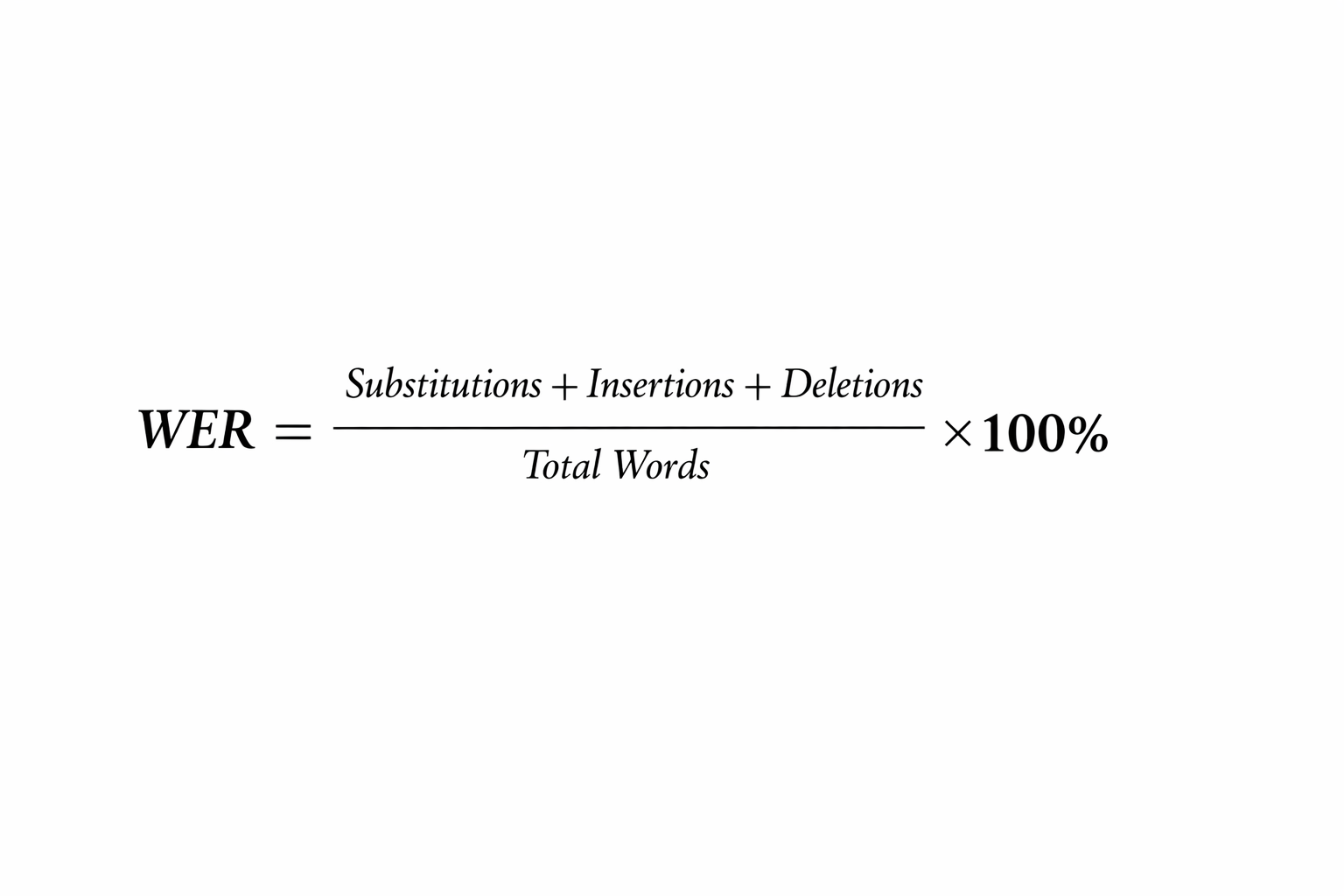
WER (Word Error Rate) measures how well an ASR system transcribes audio by counting the following three errors relative to the total number of words in the correct transcript:
- Insertions
- Deletions
- Substitutions
WER is calculated with this formula:
The challenges with calculating WER
It’s important to remember that not all errors are the same. Capitalization, punctuation, and spelling differences may be weighted differently or improperly, impacting the overall WER regardless of how technically correct the translation is.
For instance, the translation might use the British spelling of a word (i.e., center; analyse), or might include the actual number rather than spelling the number out (“15” instead of “fifteen”).
There are also conversation-specific markers that impact the accuracy of a transcription, including:
- Non‑lexical vocalizations: Short sounds like “mmh,” “mhm,” or “uh‑huh” that signal agreement, hesitation, or active listening.
- Audible events: Background or bodily sounds such as coughing, groaning, throat‑clearing, or sneezing that occur during speech.
- Prosodic markers: Symbols used to indicate changes in pitch or intonation, such as a rise, fall, or mid‑tone shift in the speaker’s voice.
- Speech‑termination markers (or disfluency terminators): Indicators of trailing off, interruptions, or rising intonation that signal incomplete or questioning utterances.
Step 4: Price out total cost with all the features you need
Accuracy is only part of the equation though. You also need to calculate the true and total cost of ownership.
Low cost of ownership
Many legacy systems started with simpler AI-powered speech-to-text. But as the technology and their own models developed, they added features such as diarization and PII redaction. However, they generally offer those new features as add-ons.
Modern platforms want to stay competitive, especially against those legacy brands, and will often offer features such as emotion detection, accent identification, diarization, and more with a low base rate.
It’s important to calculate the true costs of all of the features needed now, as well as what may be needed down the line, to understand how the model will scale with the business.
Ask these questions to gain a better understanding of total cost of ownership:
- Are speaker diarization, PII/PHI redaction, and emotion detection included in the base rate, or are they per-hour add-ons?
- For streaming, do you bill only for speech or for the total time the WebSocket is open (including silence)?
- Do you offer a free tier for large-scale evaluation (e.g., 400 hours) before a commitment is required?
Advanced feature sets
Using STT for coaching? Retention efforts? To remain compliant?
The answers will largely determine which feature sets are the most appealing/ necessary, in addition to how they’re bundled. As for the latter, you typically have the option to either bundle or add on features if they aren’t included in the base rate.
Diarization and redaction are typically add-ons with most platforms, which could balloon costs 10-12 times depending on volume and the add-on’s hourly rate. Other speciality features like emotion and accent detection are rarer to see offered at all, and will typically require some kind of customization. However, there are a few emerging brands that offer them as standard parts of the system’s architecture.
Features to look for:
- Speaker Diarization: This is the ability to determine "who spoke when". Without accurate diarization, all downstream analytics and summaries typically break down.
- Emotion and Behavior Detection: Advanced systems use acoustic signals (pitch, energy, and spectral shape) to detect emotional states like frustration, stress, and empathy. Modulate, for instance, detects 20+ emotion classes directly from the audio signal.
- Accent Identification: Ensures higher accuracy for global users and helps identify "accent spoofing" in fraud scenarios.
- Automated PII/PHI Redaction: For any organization handling financial or health-related data, redacting personally identifiable information is a legal and compliance necessity.
- Acoustic Authenticity (Deepfake Detection): This feature distinguishes between human speech and synthetic models. Looking for a top-ranked deepfake detector, such as Modulate’s, which ranks #1 on Hugging Face's Deepfake Speech Arena leaderboard, is critical for mitigating vishing and social engineering attacks.
- Custom vocabulary: Allows you to fine-tune your model with jargon that’s particularly to your industry, which helps to improve accuracy and reduce false flags.
- Multi-language support: When you operate in multiple languages and regions around the world, you need a system that can accurately process that audio data into any language.
- Automatic formatting: Clean transcripts in the same formatting with correct punctuation, numbers, and dates is a significant time saver.
12 leading speech-to-text APIs compared
There are many speech-to-text APIs available, but only a few can perform tone, intent, and behavioral analysis of the speech, including the following twelve:
- Transcribe by Modulate
- Deepgram Speech to Text API
- Google Cloud Speech to Text API
- Soniox
- OpenAI Whisper
- AssemblyAI
- Azure Speech
- Rev AI
- Speechmatics
- Amazon Transcribe
- IBM Watson Speech to Text
- Gladia
Transcribe by Modulate
Modulate’s speech-to-text API was built specifically to understand conversational speech as it occurs naturally in real life: raw, messy, and rich with meaning beyond words.
Modulate’s API delivers accurate results by combining large-scale real-world training data, deep experience running cost-efficient models, and a breakthrough Ensemble Listening Model architecture that orchestrates multiple speech-to-text models.
Key Features
- Low Real World WER: On the AMI Meeting Corpus, Modulate avoids over 40% of the errors made by ElevenLabs and over 70% of the errors made by OpenAI GPT-4o-transcribe.
- Batch & Streaming API: Use batch for large pipelines and post-call processing. Use streaming for live captions, voice agents, and real-time systems. The API supports sub-second latency for live use cases.
- Trained on Production Audio: Modulate’s transcription API was built using more than 500 million hours of real-world voice recordings from customer platforms such as enterprise software companies and Fortune 500 companies in the delivery and logistics space.
- Structured, Production-Ready Output: Get segment-level timestamps, partial streaming transcripts, and clean formatting optimized for conversational speech.
- Cost-Efficient at Scale: You pay usage-based pricing that supports large-scale deployment without inflating your infrastructure costs.
- Conversation First Foundation: Modulate’s transcription API is built on a conversation-first foundation, with emotion signals already embedded in the transcription models today, with emotion and accent signals available as low-cost enrichments on the transcription endpoint or as standalone detection APIs.
- Enterprise-Ready Security: Modulate applies ISO certified security processes across the entire organization.
- #1 on Hugging Face's Open ASR Leaderboard: Modulate ranks first out of 88 evaluated models on the industry's most widely followed public transcription benchmark, measured across seven datasets including AMI, Earnings-22, GigaSpeech, SPGI Speech, and VoxPopuli (measured August 2026).
- Multilingual Support: Transcription across 70+ languages with automatic language detection.
- Diarization Included by Default: Speaker diarization and per-utterance timing come standard rather than as metered add-ons. Emotion, accent, and PII/PHI redaction are available as low-cost enrichments.
Pros
- Extracts cleaner transcripts from real-life speech that include messy attributes like overlapping speakers and colloquial voice inflections
- Robust enough to transcribe recordings with background noise, interruptions, cross-talk, and more without requiring you to clean or preprocess your audio data
- 10x cost savings compared to other market leaders while delivering superior accuracy for real-world conversations
- Returns ready-to-use JSON that includes structure such as timestamps and speaker segments
- Easily connect transcripts to other systems for search, analytics, or feeding into ML models
- Accommodates growth so you won’t need to rebuild your infrastructure as your volume of transcribed audio increases
- Fits into existing security frameworks and compliance programs, so you can adopt it without weakening existing controls
Cons
- API ecosystem is newer compared to some long-standing speech-to-text providers, so you may find fewer community examples or SDKs initially
- Currently no on-device deployment option
Deepgram Speech to Text API
Use the Deepgram API for any application that needs fast and accurate transcription. The API can be used with any kind of audio stream or recorded audio files. Choose from models that can be used for production environments.
Key Features
- Transcribe Streaming Audio and Audio Files: Deepgram claims sub-300ms latency in streaming use cases under optimal conditions; however, latency can vary based on configuration and load. Deepgram consistently ranks high for its batch processing speed (around 30 seconds per hour of audio processed in benchmark tests).
- Choose Your Model: You can choose from a variety of models that can be used for speech-to-text. Additionally, they offer Flux, which detects when a speaker is done speaking using voice cadence instead of voice activity, now with a multilingual version covering 10 languages and mid-call code-switching.
- Speaker Diarization and Metadata Labeling: You can tag speaker segments with structured data to more easily organize, search, and analyze conversations at scale, which can be useful for use cases like call analytics and large transcription pipelines.
- Smart Transcript Formatting: This includes punctuation as well as capitalization. It also converts any number that appears in the text to a digit.
- Custom Phrase Weighting: Improve transcription accuracy by specifying likely words or phrases that you want the model to prioritize.
- Language Support: Nova-2 and Nova-3 support 35 and 48+ languages respectively, with Nova-3 coverage continuing to expand through 2026, while Deepgram’s base models support just 21 languages.
- Sensitive Data Redaction: Automate PII redaction to ensure you are always compliant.
Pros
- Comprehend speech with high accuracy despite the presence of background noise, speech, and multiple accents being spoken simultaneously
- Flexibility to use different models according to your needs, with additional options to pay for custom model training
- Support for many languages to build multilingual applications without having to change services
- Fast batch processing speeds, making it suitable for post-call analytics, transcription pipelines, and large-scale audio processing
- Option for on-prem or self-hosted deployment, which can be important for teams with strict data control or compliance requirements
Cons
- Model differences can be confusing and available features differ per individual model
- Third-party analytics, such as sentiment and behavior, may require a custom pipeline and/or a third-party tool
- Complex pricing model for a pay-as-you-go model
Google Cloud Speech to Text API
The Google Cloud Speech to Text API converts audio to text by applying Google’s large trained speech recognition models to your audio data.
Key Features
- Multilingual Support: It supports over 125 languages and dialects, making it possible for you to expand the reach of your application.
- Speaker Diarization: It‘s also able to recognize when the speaker changes, when there’s more than one speaker in the given audio file.
- Custom Phrase Weighting: Bias recognition toward domain-specific terminology, product names, or common words and phrases used in your application.
- Confidence Scores and Word-Level Timestamps: In addition to the timestamp for the transcription start time, word-level timestamps are also provided.
Pros
- Scalable for high-volume workloads, with support for integrating with other cloud-based services
- Multilingual support, including many dialects
- Basic automatic formatting, making the transcript easier to read without the need for manual formatting
- Integrates easily with the Google Cloud ecosystem
Cons
- Pricing may become costly, particularly in the processing of high-volume workloads of audio files
- May not offer the same level of low latency as other providers, depending on the implementation, network, and model used
- May have too many options, particularly for users who have basic transcription needs. Number of options may be unnecessary and require complex configuration and maintenance
Soniox
Soniox offers a single speech-to-text API for developers, but includes some important key features with minimal learning curve.
Key Features
- Supports Many Languages without Switching Models: Soniox supports transcription of speech in over 60 languages and dialects.
- Speaker Diarization: The Soniox API can automatically detect and separate speakers in real-time when there are more than two speakers in the audio being transcribed.
- Custom Phrase Weighting: Improve your transcription accuracy for specific terms and company-specific language and terminology without having to retrain your speech models.
Pros
- Easy to integrate with your application via SDKs, with minimal technical learning curve required
- One model supports over 60 languages, including multiple dialects and mixed language speech, without the need to switch between models
- Operates in multiple regions, ensuring your audio, transcripts, and logs stay in the region, meeting privacy requirements
Cons
- Token-based pricing model may make it hard to estimate costs, depending on the transcript length variations
- Smaller ecosystem and fewer integrations compared to larger cloud providers
OpenAI Whisper
Whisper-1 is the speech recognition model used in the OpenAI Whisper API, which is trained on hundreds of thousands of hours of multilingual speech data, making it a general-purpose speech recognition model. Note that OpenAI has since released newer transcription models, including gpt-4o-transcribe, gpt-4o-transcribe-diarize, and gpt-transcribe, which OpenAI now recommends over Whisper for most transcription workloads.
Key Features
- Transcribe Dozens of Languages: Whisper-1 uses automatic language detection to instantly transcribe up to 99 languages.
- Easy API Integration: Upload an audio file or send an audio stream, and you get a transcript. You can use Python, JavaScript, and many more programming languages to stream the audio and get the transcript results in your application.
- Supports Common Audio Formats: Whisper API can accept a variety of audio inputs, including WAV, MP3, M4A, and many more.
Pros
- Transcribes many languages with a single model, reducing the need to use separate models for different languages
- Handles accents, varying speech rates, and background noise reasonably well for a general-purpose model, though purpose-built conversational models now outperform it on noisy multi-speaker audio
- Includes timestamps at segment and word levels to align the text with the audio for better captions and search functionality
- Open-source model gives users full control over deployment, customization, and data handling
Cons
- File size limit of 25 MB, which can be a drawback for long recordings or large files that need to be transcribed
- Whisper itself has no streaming endpoint, so live use cases require moving to one of OpenAI's newer transcription or realtime models
- Whisper doesn’t include speaker diarization; you would need a separate service or OpenAI’s gpt-4o-transcribe-diarize model for that
AssemblyAI
Get accurate transcriptions with features that help you better understand your voice data. It’s useful for anything from generating captions, meeting notes, or building conversational analytics, to building voice agents.
Key Features
- Diarization: AssemblyAI offers speech understanding features such as speaker labels/roles, text sentiment, topics, and summarization.
- Multi-Language Support: Universal-2 supports up to 99 languages, while the newer Universal-3 Pro and Universal-3.5 Pro models natively support six (English, Spanish, Portuguese, French, German, and Italian) and route to Universal-2 for the rest.
- Custom Phrase Weighting: Create a bias for recognizing slang, industry jargon, brand names, or other domain-specific terms without retraining the model.
- Automatic Formatting: The transcripts are automatically formatted, including punctuation and capitalization. This also includes lists and numbers.
- Build Flexible Integrations: With SDKs and extensive documentation, integrating the REST and WebSocket endpoints is easy.
- Flexible Pricing: AssemblyAI offers a pay-as-you-go pricing model. There are different models to choose from, as well as speech understanding add-ons to suit your needs.
Pros
- Highly accurate transcriptions with additional contextualization features enabled
- Strong developer experience with clear documentation, SDKs, and easy integration workflows
- Flexible API design supports real-time and batch use cases
Cons
- Speech understanding add-ons like summarization or topic detection are in more expensive tiers and require per-transcript metadata configuration, which can become costly if your use case requires multiple features
- If your use case doesn’t require features like sentiment analysis, fact checking, or custom words, deciding which plan and model to use can become confusing
- Latency will depend on internet speeds as well as which model is being used
Azure Speech
The Azure Speech to Text API (by Microsoft Foundry) allows users to integrate other Azure services to build speech and language solutions. The entire platform is hosted in Microsoft’s cloud infrastructure and can scale from small apps to large enterprise solutions.
Key Features
- Broad Language Support: Users can create apps for global consumers without changing anything.
- Formatting & Speaker Diarization: By default, the Azure Speech to Text API includes punctuation and capitalization in transcripts. Azure can perform speaker diarization to automatically identify and tag speakers in audio with more than one speaker.
- Speaker Recognition (Voice Profiles): Azure also offers speaker recognition that lets you identify a specific person in audio; however, voice profiles (voice ID prints) must be stored prior to identification.
- Custom Phrase Weighting and Custom Model Training: Azure offers even more control with custom model training for advanced scenarios.
- Timestamps and Word Confidence: Timestamps are provided at each word so users can match their transcriptions to audio. Confidence scores are also provided so users can identify which words in a transcription may need to be reviewed.
Pros
- Word timestamps and confidence values are provided to match transcriptions to audio or to identify quality
- Integrated into Microsoft’s cloud-based infrastructure to offer security and compliance to most enterprise standards (requires use of Azure services)
- Integrates directly with other Azure products like Blob Storage, Cognitive Search, Logic Apps, etc. so users don’t need to leave Azure to build integrations
Cons
- The pricing structure can be complex depending on the options chosen (CSV, Translation, Speaker Identification) as well as the volume of audio being processed
- Latency on live streams can also fluctuate depending on network speeds as well as the chosen configuration
- Additional features such as scaling, storage, and analytics would require additional features from other Azure products that may not work with the chosen tech stack or budget
- Elevated risk as models and associated services can be rapidly deprecated, requiring users to navigate and migrate within the ecosystem as a cost of doing business
Rev AI
The Rev AI speech-to-text API is best used by developers who need high-quality speech recognition for integration with applications. The Rev AI speech recognition models are trained on millions of hours of data and have a low word error rate (WER) on a wide variety of real-world audio.
Key Features
- Custom Phrase Weighting: Customize Rev AI's speech recognition models to best suit your needs by training them to prioritize industry-specific words, jargon, or brand names.
- Speaker Diarization and Timestamps: Add speaker labels to your transcript to differentiate between speakers for batch transcription. Word-level timestamps can be used to sync the text to the audio (for captions or further analysis).
- Wide Language Support: Speech recognition is available in more than 50 languages asynchronously.
- Post-Transcription Insights: Get more insights from your speech transcripts with translation, text sentiment analysis, language identification, and topic extraction for batch transcription.
Pros
- Speech recognition comes back punctuated, capitalized, and normalized to reduce post-processing needs
- Offers asynchronous topic extraction for batch transcription, including both unstructured topic discovery and prompted keyword-based analysis for post-transcription insights
- The REST API is very simple to use, and the documentation is complete and available online without needing to sign up for an account
Cons
- Some additional features are paid options, which can become expensive compared to some of the other options
- Most additional features are only available for batch transcription
- If you’re looking to do ultra-low latency (less than 100ms) speech to text for live customer agents, then you’re better off with a specialized speech to text engine
- You’ll also need to develop an external pipeline or integrate with analytics tools of choice
Speechmatics
Speechmatics provides speech-to-text transcription in dozens of languages and accents with its speech recognition API. Send in prerecorded audio files or audio streams to extract clean text from virtually any audio source with features such as custom vocabulary support and speaker diarization.
Key Features
- Works with Dozens of Languages: Supports more than 55 language and dialect combinations.
- Custom Phrase Weighting: Improve transcription accuracy by specifying words or phrases that you want the model to prioritize.
- Speaker Diarization and Channel-Based Speaker Labels: Speechmatics offers per-channel metadata speaker labeling, which is useful when you have one speaker per audio channel.
- Flexible Output: Speechmatics provides word-level timestamps and confidence scores for each word in its transcripts by default.
Pros
- Output includes word-level timestamps and confidence scores to line up your transcripts with the audio and decide how to handle words that are below a certain confidence level
- Deploy the API on the cloud infrastructure, on-device, or on your own hardware/virtual private server to satisfy compliance requirements
- Flexible speaker handling options, including standard diarization, per-channel metadata speaker labeling, and voice ID using known voice prints
Cons
- Summarization, sentiment, and topic detection are available, but as Speech Intelligence add-ons layered on top of transcription rather than included in the base rate
- Not necessarily the best API to use when you need ultra-low latency responses (live voice assistants that need to respond in <100ms, etc.)
- Requires work to create custom vocabularies that will be best suited to your application
Amazon Transcribe
Transcribe is a speech-to-text API that allows users to add speech-to-text capabilities to their applications, streamline workflow, and leverage speech as part of analytics.
Key Features
- Multi-Language Support: Transcribe supports over 100 languages, so you can create multilingual applications without using many services.
- Automatic Formatting: This can save you some steps if you need transcripts and are planning to use them as-is for another process.
- Speaker Diarization and Channel Identification: Identify speakers who are involved in a conversation contained in a single file. Channel identification enables you to identify which channel a speaker was on if there are multiple channels in a recording.
- Custom Vocabulary and Language Models: You can improve recognition for domain-specific terms, acronyms, and uncommon phrases by adding custom vocabularies or training custom models.
- Content Moderation and Redaction: Easily configure to redact words that go against policies, and automatically detect PII.
- Timestamps and Confidence Scores for Words: Word-level timestamps as well as word confidence scores.
- Domain-Specific Variants: If you’re looking to extract information from doctor-patient interactions, try Amazon Transcribe Medical. If you want to gain customer insights from call centers, there’s Amazon Transcribe Call Analytics.
Pros
- Can provide custom vocabulary and build your own language models
- Has content moderation tools to filter out unwanted words to ensure compliance
- Provides word-level timestamps along with confidence scores to evaluate the quality of your transcript
- Can easily integrate with other AWS products
- Specialized modules designed for the healthcare and contact center verticals
Cons
- Using special features on multiple domains can be costly
- Using Amazon Transcribe to its full potential can also require additional AWS products such as storage, compute power, and other data analytics tools
- May take work to integrate with your current infrastructure if you’re not using AWS products
- Ultra-low latency use cases might require other architectures or tuning
- Heavily accented speech or less common languages and noisy audio might not transcribe well
IBM Watson Speech to Text
Watson Speech to Text API is a part of IBM Cloud and is highly scalable from prototypes to production environments.
Key Features
- Supported Languages: Supports 12+ languages.
- Automatic formatting: The speech-to-text API is capable of automatically formatting your transcript with punctuation and capitalization. So, you don’t have to perform any additional operations to get a readable transcript.
- Speaker Diarization: The speech-to-text API is capable of labeling up to 6 different speakers within a conversation. One-speaker-per-channel labels are also supported.
- Word-Level Timestamps and Word Confidence Scores: Outputs include word-level timestamps, which will allow you to align the transcript with the corresponding time in the audio file.
Pros
- Doesn’t require cleaning the transcript before you can use the results in an application
- Customizable with your own data and vocabulary for better recognition
- Improves over time, recognizing industry-specific terms and jargon
- Provides word-level timestamps, word confidence scores, and support for real-world noisy audio
- Supports on-premises and private cloud deployment via IBM Cloud Pak for Data, providing full control over data residency, compliance, and air-gapped environments
Cons
- Its pricing model is complicated, depending on the scale of the application and the usage patterns
- For maximum benefit, security, data analytics, and the like, you would likely have to use other IBM Cloud tools, which might not integrate well with non-IBM infrastructures
- Customization may take time, depending on whether you want custom vocabulary support or acoustic models
- Lacks the bells and whistles of topic detection, summarization, or sentiment analysis, unlike some of its peers
- May have varying latency depending on the network, making it less than optimal in such cases
Gladia
The Gladia Speech to Text API recognizes more than one hundred languages while at the same time allowing developers to get additional text data and insights that can be integrated with a variety of applications, including meetings, call analytics, voice assistants, video ingestion, among many more. The automatic speech recognition system comes with a variety of intelligent options that can be used to generate machine-readable transcripts as well as metadata.
Key Features
- Multilingual Support: Gladia supports more than one hundred languages, including major languages as well as their respective dialects.
- Speaker Diarization with Word-Level Timestamps: Gladia supports speaker diarization in both batch and real-time transcription. Word-level timestamps help you include time references next to your transcribed text at a high degree of accuracy.
- Custom Vocabulary and Custom Spellings: Gladia offers advanced customization beyond standard phrase weighting, allowing you to define phonetic pronunciation, specific language, and phonic intensity.
- Audio Intelligence Add-Ons: The API not only provides basic text output but also offers add-ons such as entity recognition, translation, and text sentiment analysis.
Pros
- You can also add your own vocabulary, so it can better understand industry-specific terms that have different spellings with a high level of fine-tuning at the phonetical level
- Strong multilingual support, often cited by customers building applications for global or multilingual user bases
Cons
- Lag times will vary depending upon your API integration
- All-inclusive pricing bundles diarization, translation, and sentiment into one rate, which simplifies forecasting but means you pay for audio intelligence even when you only need a raw transcript
Choosing the right solution
The best speech-to-text API is the one that holds up on your audio (no matter how “messy” it is), at your volume, at a price that still works when you're processing real world voice data, not just a sample of audio.
That's the true test. Benchmark scores on clean datasets tell you how a model performs in a lab. Your support calls, your sales conversations, your agent interactions, or your clinical encounters are the only test that counts. Run the four-step evaluation on a statistically significant sample size of your own audio data to see what works best.
A few things worth carrying into that evaluation:
- Price the whole system: Diarization, redaction, emotion, and billed silence on open streaming connections can multiply a headline number several times over. Ask what's included and what's metered.
- Decide what you need beyond words: If tone, accent, or synthetic-voice detection matter to your use case, a transcript-only vendor means bolting on a second system later and reconciling two sets of timestamps.
- Match the architecture to the job: Voice agents need turn-taking and sub-second latency. Post-call analytics need throughput and unit economics. Regulated workloads need deployment control. These are all factors to consider when making a decision.
- Check for reliability at scale: The STT solution that works at 1,000 hours a month should still work at 100,000, and so on, at a realistic price point and the same accuracy.
Transcription is the input layer for everything downstream: analytics, coaching, compliance, fraud detection, agent governance, and whatever your team builds next. Every signal the transcript drops is a signal those systems never get.
Choose the layer that keeps the meaning intact.
Want a starting point? Compare unaltered results from leading providers side by side at speechtxt.com, or run your own audio through Modulate Transcribe's free tier to see for yourself.